444LIVE / LTC 444LTC · SHOW TIMECODE ENGINE
LTC, done before your coffee is.
LTC delivery for Pro Tools and Ableton Live. Every song generated, placed in your session and verified, with cue sheets and L/R files included.
macOS 12+ · Universal · Pro Tools 2024.10+ · Ableton Live 12.0.5+
REVIEW
Review set list
| # | SONG (MARKER) | TIME CODE | LENGTH (editable) | SOURCE | |||
|---|---|---|---|---|---|---|---|
| ⠿ | ▲▼ | T01 | S1-Opening | 00:00:00:00 | 3:00 | SONG END + 1 bar · measured | |
| ⠿ | ▲▼ | T02 | S2-Intro | 00:30:00:00 | 3:17 | SONG END + 1 bar · measured | |
| ⠿ | ▲▼ | T03 | S3-Fireworks | 01:00:00:00 | 3:34 | SONG END + 1 bar · measured | |
| ⠿ | ▲▼ | T04 | S4-Slow Dance | 01:30:00:00 | 3:51 | SONG END + 1 bar · measured | |
| ⠿ | ▲▼ | T05 | S5-Encore | 02:00:00:00 | 4:08 | SONG END + 1 bar · measured |
FIG. 0 · Set list review
01 · SOURCE
Pick your DAW. Set the format. Analyze.
- Detects which DAW is online.
- 24 to 30 fps, including 29.97 DF.
- 44.1, 48 and 96 kHz.
Signal format
FIG. 1 · Source
02 · REVIEW
The table order is the show order.
- Drag or ▲▼ to reorder. TC recalculates instantly.
- Edit any length. The table wins.
- Tick only the songs you need.
Time code plan
| # | Song | TIME CODE | Length | ||
|---|---|---|---|---|---|
| ⠿ | T01 | S1-Opening | 01:00:00:00 | 3:00 | |
| ⠿ | T02 | S3-Fireworks | 01:30:00:00 | 3:34 | |
| ⠿ | T02 | S2-Intro | 01:30:00:00 | 3:17 | |
| ⠿ | — | S4-Slow Dance | —— | 3:51 | |
| ⠿ | T03 | S5-Encore | 02:00:00:00 | 4:08 |
FIG. 2 · Drag to reorder
03 · CREATE
Every song verified. No eyeballing.
- Generated, placed on the LTC track, sample-aligned.
- Every song is decoded back and checked.
- Cue sheet and TC_LOCK export together.
Done — every song verified
LTC placed on the LTC track and verified song by song; cue sheet and TC_LOCK written to “MyShow_2026”.
Create T01  01:00:00:00  S1-Opening
Create T02  01:30:00:00  S2-Intro
Create T03  02:00:00:00  S5-Encore
WAVs generated (3 songs, per-file decode self-check PASS)
Audit PASS: all 3 clips in place (flush starts, Warp off, no overlap)
FIG. 3 · Create & verify
04 · PRINT
One L/R deliverable per song.
- Left = Click & Cue. Right = LTC.
- Pick multiple sources, or whole groups.
- WAV, MP3, or both.
Left channel sources
Right channel sources (incl. LTC)
FIG. 4 · Print
IN YOUR SESSION
Here's your session when it's done.
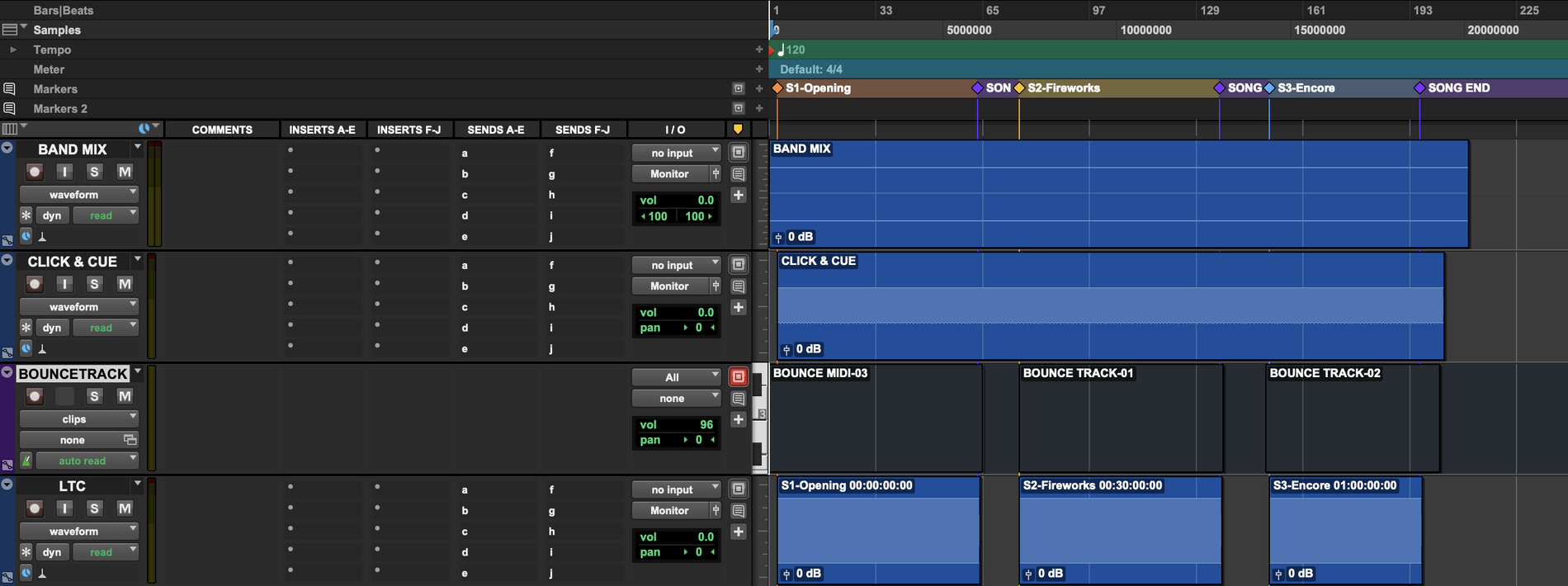
FIG. 5 · Pro Tools · each LTC clip named with its song and start TC
CUE SHEET
The cue sheet writes itself.
- Every song with its LTC In timecode.
- CSV for spreadsheets. Markdown for messages and docs.
- Send it straight to lighting, video and stage management.
MyShow_2026
MyShow_2026_LTC_cuesheet.csv
| A | B | |
|---|---|---|
| 1 | Song | Time Code |
| 2 | S1-Opening | 00:00:00:00 |
| 3 | S2-Intro | 00:30:00:00 |
| 4 | S3-Fireworks | 01:00:00:00 |
| 5 | S4-Slow Dance | 01:30:00:00 |
| 6 | S5-Encore | 02:00:00:00 |
FIG. 6 · Output folder · cue sheet (CSV)
RULES
One song. One marker.
Locator
S1-OpeningNumber plus song nameS6EncoreSeparator optionalSONG ENDOptional. Trims the code at the song's end.
LTC marker ruler
LTCCreate a ruler with this nameOpeningNo prefix neededV1 · C1Section markers are ignored
SAFETY
Built for live. No second takes.
01
Verified per song
Each song is decoded back and compared. Mismatches turn red.
02
Only its own tracks
Your own LTC track is never deleted.
03
Zero install, offline
Python and ffmpeg ship inside the app. No internet needed.
04
Recoverable
Keeps a recovery record if processing is interrupted.
LICENSE
Buy it. Don't rent it.
One edition, every feature
Specs
| DAW | Pro Tools 2024.10+ · Ableton Live 12.0.5+ |
| FRAME RATE | 24 · 25 · 29.97 ND · 29.97 DF · 30 |
| SAMPLE RATE | 44.1 · 48 · 96 kHz |
| BIT DEPTH | 16 · 24-bit |
| LEVEL | -3 · -6 · -12 · -18 dBFS |
| OUTPUT | LTC WAV per song · L/R WAV + MP3 |
| CUE SHEET | CSV · Markdown (song · LTC In) |
| TC_LOCK | JSON: song → start TC → LTC file |
| SYSTEM | macOS 12+ · Universal |
| LANGUAGE | English · 繁中 · 简中 |
TRIAL
Free for 30 days.
Every feature.